Automotive · service centre
Auto service management system
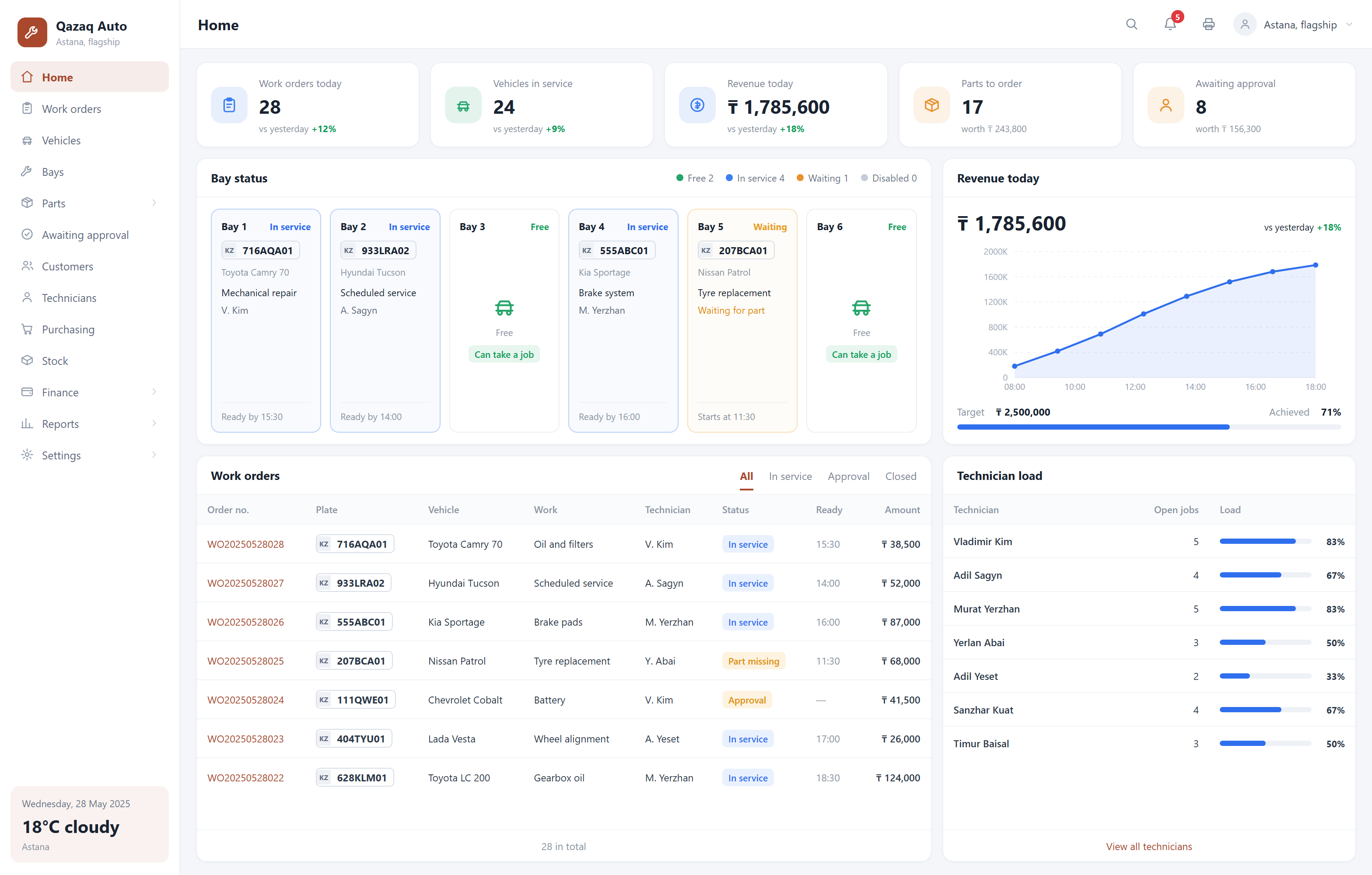
A customer calls to ask whether the car is ready, and the front desk has to walk to the shop floor. At month end the mechanic and the owner each bring a sheet of paper, and the numbers never match. This system pulls the whole job into one work order — quote, extra work, parts and hours all hang off it, and the customer scans a code to check progress themselves.
What it solves
The quote never matches what you collect
A verbal estimate, extra work added along the way, a part swapped for a different brand — the final figure comes down to who remembers what. Here every added item has to be approved by the customer before work starts, and the final invoice builds itself.
Nobody knows which car a part went into
Someone takes a part from the store and walks off; at stocktake it does not add up. Parts can only leave through a work order — which car, who took it, at what price, all on the record.
Regulars drift away unnoticed
Was the last service three months ago or a year? Nobody remembers. The system pushes service reminders by mileage and by date, turning one-off jobs into returning customers.
Before and after

- The work order is a sheet of paper drifting around the shop with the car
- A customer calls for an update and the front desk walks to the bay
- Parts issued are written in a notebook; stocktake never balances
- The mechanic reports his own hours and the owner has to take his word
- One digital work order from intake to hand-over
- The customer scans a code and reads the status and quote himself
- Parts leave through the work order, so you see which car they went into
- Standard hours calculate the bonus; both sides read the same sheet
Capabilities
Vehicle file: plate, VIN, mileage and the full repair history
Work order flow: intake → quote → customer approval → repair → hand-over
Quotes and extra work approved by the customer straight from WhatsApp
Parts issued through the work order, linked live to stock
Standard hours and automatic mechanic bonus calculation
Service and inspection reminders by mileage or date
Bay status board, so the front desk stops walking to the shop floor
Independent service centres, express-service chains, tyre and suspension shops, body and paint centres, and dealer service stations with a repair bay.
FAQ
We run two sites — can we manage both?
Yes. Work orders, parts stock and mechanics are reported per site, while the owner sees everything under one account. Moving parts between sites is recorded too, so "where did that part go" stops being a question.
Can it reconcile with 1C?
The usual approach is a monthly export in 1C format that your accountant imports directly, leaving your existing bookkeeping untouched. A live integration is possible too, but we would first need to look at your 1C version and how it is deployed; that part is scoped separately.
How much does a system cost?
It depends on the feature set, how many locations you have and whether hardware integration is needed. Using a ready module costs significantly less than building from zero. We can give a range after the first conversation, and once the scope is agreed the price is fixed — we do not bill by the hour.
How soon can we start using it?
If the module is used largely as-is, 2–3 weeks. If it needs substantial adaptation to your process, usually 4–6 weeks. The timeline is stated in the proposal.
Where is the data stored? Can it be on our own server?
It can. By default the system runs on servers we maintain, which is simpler for you. If you have compliance or internal control requirements, we deploy entirely on your server or on a machine in your premises, and data never leaves your network.
Other systems
Gym membership system
Retire the paper log and the spreadsheet: memberships, personal training and renewal reminders in one place.
QR self-ordering system
Guests scan, order and pay themselves while the order goes straight to the kitchen — fewer queues, fewer mistakes, lower staffing cost.
Internet café management system
Session billing, client balances and seat status on a single screen at the front desk.