Supply · Warehouse
Inventory and purchasing system
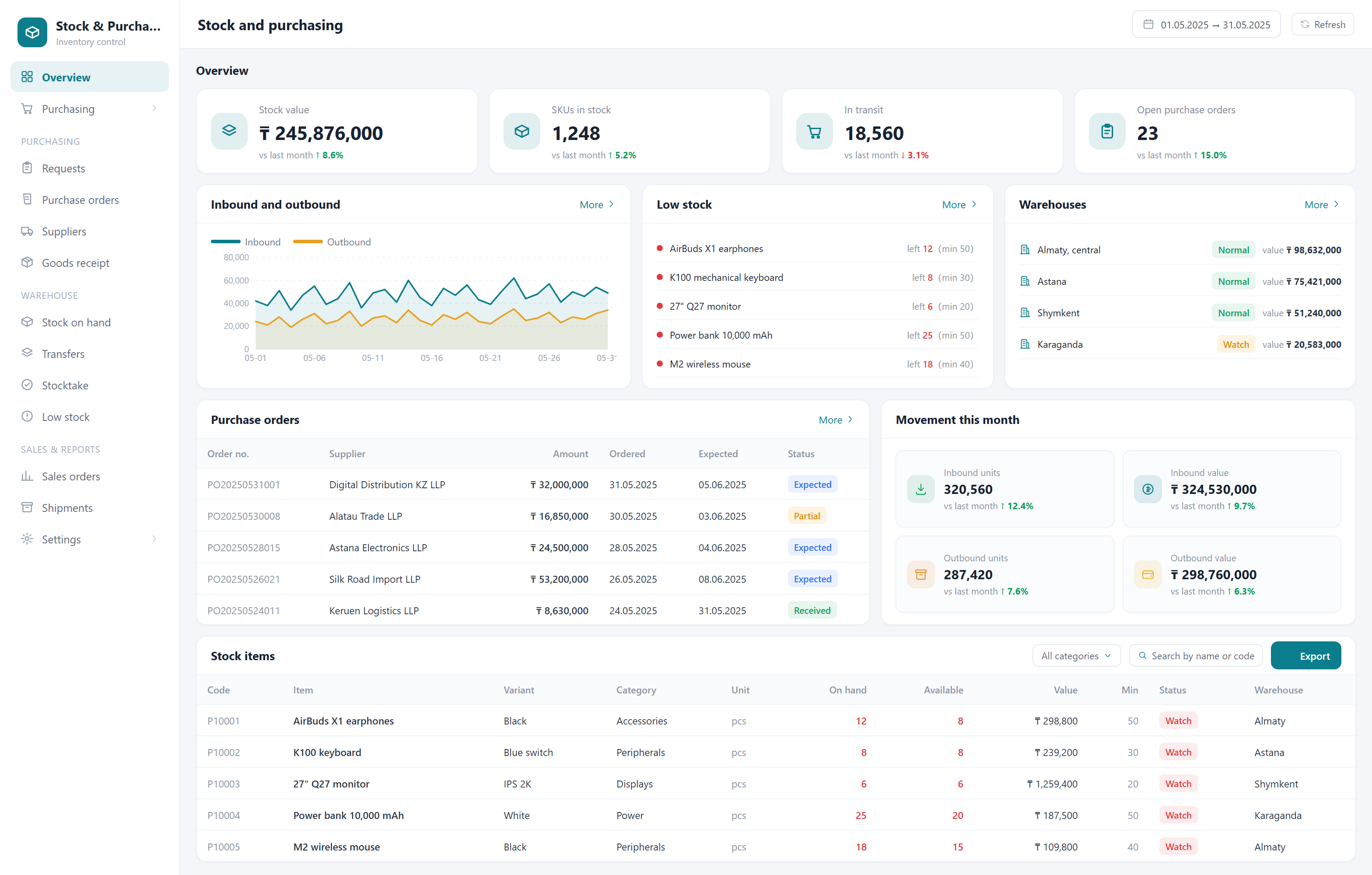
Every day stock sits in the warehouse it costs money. This system links purchasing, receiving, dispatch and stocktaking into one chain and answers two questions at any moment: how much do we have, and what needs reordering.
What it solves
Real stock levels are unknown
The books disagree with the shelves, and the only way to check is to close and count. Here every movement is recorded, so you can see exactly where the discrepancy appeared.
Stockouts and dead stock at the same time
Fast movers run out while slow movers fill the warehouse. The system calculates safety stock from sales history and suggests what to actually buy.
Expiry dates discovered too late
Expiry is tracked per batch and warnings arrive early enough to run a promotion instead of writing the goods off.
Before and after

- The books disagree with the shelves, and checking means closing the shop
- Fast movers run out while dead stock fills the warehouse, both at once
- Expiry dates surface when it is already too late to do anything but write off
- Every location counts its own way and nobody knows the total
- Every movement is recorded, so you can see exactly where the gap appeared
- Safety stock is calculated from sales history and reminds you to reorder in time
- Expiry is tracked per batch and warns early enough to sell it down
- All warehouses and stores in one table, so you know where the goods and the money are
Capabilities
Purchase orders, supplier directory and purchase pricing
Receiving, dispatch, inter-store transfers and returns
Safety stock thresholds and automatic reorder suggestions
Tracking by barcode, batch number and expiry date
Stocktaking and variance analysis
Separate accounting across multiple warehouses and stores
Turnover and dead stock reports
Supermarkets and retail chains, central kitchens, wholesalers, auto parts and building materials — any business with a warehouse.
FAQ
Do we need a barcode scanner?
Not necessarily — a phone camera is enough for a small warehouse. At higher volume a wired scanner is worth it; a few thousand tenge saves a lot of working time.
Can it be linked to the till?
Yes, and that is where most of the time saving comes from: a sale deducts stock automatically. It depends on whether your current till is open to integration.
How much does a system cost?
It depends on the feature set, how many locations you have and whether hardware integration is needed. Using a ready module costs significantly less than building from zero. We can give a range after the first conversation, and once the scope is agreed the price is fixed — we do not bill by the hour.
How soon can we start using it?
If the module is used largely as-is, 2–3 weeks. If it needs substantial adaptation to your process, usually 4–6 weeks. The timeline is stated in the proposal.
Where is the data stored? Can it be on our own server?
It can. By default the system runs on servers we maintain, which is simpler for you. If you have compliance or internal control requirements, we deploy entirely on your server or on a machine in your premises, and data never leaves your network.
Other systems
Gym membership system
Retire the paper log and the spreadsheet: memberships, personal training and renewal reminders in one place.
QR self-ordering system
Guests scan, order and pay themselves while the order goes straight to the kitchen — fewer queues, fewer mistakes, lower staffing cost.
Internet café management system
Session billing, client balances and seat status on a single screen at the front desk.